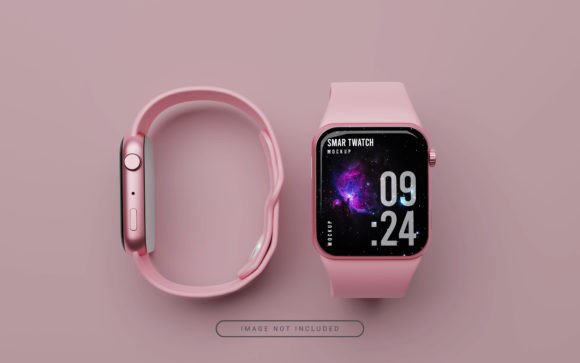
Elevating Brand Presentations with a Realistic Smart Watch Mockup
In the competitive landscape of wearable technology and digital design, the difference between a concept that sells and one that stalls often lies in presentation. Clients and customers rarely buy a flat JPEG of a user interface; they buy the vision of how that interface looks on their wrist. This is where a Realistic Smart Watch Mockup becomes an indispensable asset in your creative workflow. It bridges the gap between abstract design files and tangible product reality, allowing professionals to visualize, refine, and market their work with precision.
Integrating high-quality mockups into your process is not merely about aesthetics; it is a strategic move that impacts efficiency, client communication, and conversion rates. Whether you are a freelance UI designer, a marketing manager for a tech startup, or an entrepreneur launching a custom watch face store, understanding how to leverage these tools can streamline your operations significantly.
The Strategic Role of Visualization in Design Workflows
A Realistic Smart Watch Mockup serves as a critical checkpoint in the design lifecycle. Before a single line of code is written for a production app, or before a manufacturing order is placed for a physical band, stakeholders need to see the end result. Using a mockup early in the process allows for rapid iteration. You can test color contrasts, typography legibility on small screens, and overall composition without the overhead of building a functional prototype.
During the middle stages of a project, these assets facilitate clearer communication between designers and developers. When a designer hands off a file accompanied by a realistic render, the developer has a concrete reference for spacing, lighting effects, and depth. This reduces ambiguity and minimizes the back-and-forth that often plagues collaborative projects. Furthermore, for educators and mentors teaching interface design, showing students how their flat designs translate to a 3D curved surface provides invaluable context regarding modern screen constraints.
Seamless Integration with Adobe Photoshop
One of the primary advantages of using professional-grade PSD mockups is their compatibility with industry-standard software. The workflow is designed to be hassle-free, requiring no specialized 3D modeling experience. The process relies on "Smart Objects," a powerful feature in Adobe Photoshop that preserves an image's source content with all its original characteristics.
To implement this in your daily routine, the process is straightforward yet robust:
- Initialization: Open the provided PSD file in Adobe Photoshop. The file structure is typically organized with labeled layers, ensuring you know exactly where to place your assets.
- Embedding Design: Locate the specific layer named "place your design here" or similar. Double-clicking the thumbnail of this Smart Object opens a new document window.
- Customization: In this new window, drag and drop your flat design file (PNG or JPG). Ensure your design matches the canvas dimensions for optimal clarity. Save this file.
- Rendering: Return to the main PSD file. Photoshop automatically updates the 3D model, wrapping your design around the watch face with realistic curvature, lighting, and shadow interactions.
This non-destructive editing method means you can swap out designs instantly. If a client requests a color change or a different layout, you simply update the Smart Object, save, and the main mockup refreshes immediately. This speed is crucial when working under tight deadlines or during live brainstorming sessions.
Enhancing Marketing and Portfolio Development
For marketers and small business owners, the utility of a Realistic Smart Watch Mockup extends far beyond internal reviews. It is a potent tool for external promotion. Social media platforms like Instagram, LinkedIn, and Pinterest are highly visual; posts featuring realistic product renders consistently outperform those with flat screenshots.
When promoting an online shop or a new app launch, these mockups provide the necessary context. They allow potential clients to envision the product in their daily lives. For instance, a blog post reviewing a new fitness tracker gains credibility when accompanied by high-resolution images showing the device on a wrist, complete with reflections and environmental lighting. This level of detail signals professionalism and attention to quality.
Freelancers and agencies can also use these assets to build compelling portfolios. Instead of displaying a grid of static screens, a portfolio featuring dynamic, 3D-rendered watch faces demonstrates an understanding of the final medium. It shows prospective clients that you care about the presentation of your work, which often translates to higher perceived value and better pricing power.
Quality Standards and Technical Specifications
Not all mockups are created equal. The effectiveness of your presentation depends heavily on the resolution and lighting quality of the asset you choose. High-quality mockups, such as the ones described in this workflow, typically offer resolutions around 4000x3000 pixels at 300 DPI. This specification is vital for two reasons:
- Print Readiness: If you intend to use these images in brochures, business cards, or trade show banners, 300 DPI ensures the output remains crisp and free of pixelation.
- Retina Display Optimization: Even for digital use, starting with a high-resolution source allows you to scale down for web use while maintaining sharpness on high-density screens found on modern smartphones and laptops.
Lighting is another critical factor. A superior mockup includes realistic shadows, ambient occlusion, and specular highlights that react naturally to the design placed upon them. This creates a sense of depth that flat images cannot achieve. When selecting a mockup for your toolkit, ensure the lighting direction complements your design. If your interface relies heavily on dark mode, a mockup with softer, diffused lighting might showcase the contrast better than one with harsh, direct sunlight.
Optimizing Workflow Efficiency and Consistency
In a professional setting, consistency is key to brand identity. Using a standardized set of mockups ensures that all your promotional materials, from social media posts to pitch decks, share a cohesive look and feel. By establishing a library of go-to mockup files, you reduce the time spent searching for assets and eliminate the risk of using inconsistent styles across different campaigns.
Preparation plays a significant role in maximizing efficiency. Before starting a project, organize your design files and ensure they are layered correctly. Naming conventions matter; a file named watch_face_v1_final.psd is far easier to manage than design_new_edit.psd. Additionally, keep your Smart Object files separate from the main mockup file if you plan to archive versions. This practice allows you to revisit old designs and re-render them with updated mockup templates if your branding evolves.
Compatibility is generally high, as PSD is a universal format in the creative industry. However, always verify that your version of Photoshop supports the specific features used in the mockup file, such as newer blending modes or smart filter adjustments. Most modern mockups are backward compatible, but staying updated ensures you have access to the latest performance improvements.
Long-Term Value and Adaptability
Investing time in mastering the use of realistic mockups yields long-term dividends. As your career or business grows, the ability to rapidly produce high-fidelity visuals becomes a core competency. These tools adapt to various scenarios: pitching a new idea to investors, creating ads for a crowdfunding campaign, or simply documenting a case study for your website.
Moreover, the versatility of these files means they can serve multiple purposes over time. A mockup created for a client presentation today can be repurposed next month for a social media ad, and later included in a year-end report. The inclusion of a JPEG version alongside the PSD offers immediate usability for quick shares, while the PSD retains the flexibility for deep customization.
Ultimately, the goal is to make the technology invisible. When a viewer sees your work, they should focus on the design and the value it provides, not the tool used to display it. A well-executed Realistic Smart Watch Mockup achieves exactly this, providing a seamless window into your creative vision and helping you connect more effectively with your audience.