Mastering Motion Text Effects in Blur Backgrounds with 3D Typography
In the fast-paced world of digital design, capturing attention within the first few seconds is paramount. Whether you are a seasoned graphic designer or a content creator looking to elevate your social media presence, the visual impact of your typography can make or break your project. One of the most compelling trends currently dominating the creative landscape is the combination of motion text effects set against a blur background, enhanced by detailed 3D typography. This specific aesthetic does more than just look cool; it creates depth, directs focus, and imbues static images with a sense of dynamic energy.
Understanding how to leverage these effects efficiently is crucial for modern creators. Fortunately, advanced graphic resources now offer a streamlined way to apply these high-quality styles without needing hours of manual rendering. By utilizing smart object technology, designers can transform simple text, shapes, or vector logos into professional-grade visuals instantly. This article explores the significance of this design style, how it functions technically, and its vast array of practical applications in today's digital ecosystem.
The Psychology and Purpose of Blurred Motion
Before diving into the technical "how-to," it is essential to understand the "why." Why do motion text effects on blur backgrounds resonate so strongly with audiences? The answer lies in human perception and the principles of depth of field. In photography and cinematography, a blurred background (often called bokeh) naturally forces the viewer's eye to focus on the sharpest element in the frame—the subject. When applied to typography, this technique isolates the text, making the message undeniable.
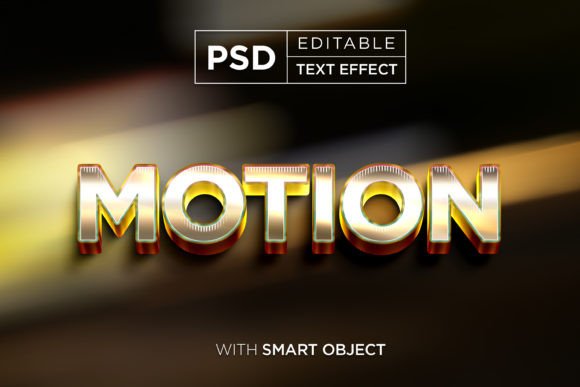
Adding a motion effect to this equation introduces a narrative element. It suggests speed, urgency, or futuristic technology. It implies that the brand or the message is moving forward. When combined with 3D typography, which adds volume and tangible weight to the letters, the result is a visual hierarchy that is both aesthetically pleasing and functionally effective. It bridges the gap between flat design and immersive reality, making it a powerful tool for storytelling in marketing and entertainment.
Demystifying the Technology: Smart Objects and Layer Organization
Historically, creating a high-resolution 3D text effect with motion blur required extensive knowledge of complex software tools, lighting setups, and rendering engines. It was a time-consuming process that often resulted in large file sizes and rigid workflows. However, modern graphic resources have democratized this capability through the use of Smart Objects.
A Smart Object is a container in image editing software that preserves an image's source content with all its original characteristics. In the context of these text effect templates, the heavy lifting regarding lighting, shadow calculation, blur algorithms, and 3D extrusion has already been done by the template creator. The user is left with a well-organized layer structure that is intuitive and easy to navigate.
To edit such a file, the process is remarkably simple:
- Open the PSD File: Launch the provided high-resolution file (typically around 3000x2000 pixels).
- Locate the Smart Object: Identify the specific layer designated for text replacement.
- Insert Your Content: Replace the placeholder with your own simple text, custom shapes, or vector logo.
- Save and Update: Upon saving the smart object, the main document automatically updates, applying the complex 3D and motion effects to your new content instantly.
This workflow ensures that even beginners can achieve results that mimic high-end studio production. With features like 100% editable layers, users retain full control over color grading, intensity of the blur, and the angle of the motion, allowing for endless customization while maintaining structural integrity.
Practical Applications Across Industries
The versatility of motion text effects with blur backgrounds extends far beyond simple artistic expression. These assets are vital tools across various sectors of the digital economy. Because the output is usually a high-resolution image (such as a 3000x2000 PX file), it scales beautifully for both web and print media.
Digital Marketing and Social Media
In the realm of social media, standing out in a crowded feed is a constant challenge. These effects are perfectly suited for:
- Facebook and Twitter Covers: Create a striking header that immediately communicates brand identity.
- YouTube Thumbnails and Banners: High-contrast 3D text grabs clicks and improves channel recognition.
- Banner Promotions: For website headers or ad campaigns, the motion blur suggests limited-time offers or dynamic sales events.
Entertainment and Media Production
The film and gaming industries rely heavily on atmospheric typography. This style is ideal for:
- Movie Titles and Posters: Evoking genres like sci-fi, thriller, or action through speed lines and deep shadows.
- Cartoon Titles: Adding a playful yet polished look to animated series introductions.
- Logo Presentations: Giving a static logo a sense of life and movement during intro sequences.
Merchandise and Print Design
While motion implies digital screens, the high-resolution nature of these files makes them excellent for physical products. The depth created by 3D typography translates well to:
- T-Shirt and Clothing Design: Bold, dimensional text stands out on fabric.
- Flyers and Placards: Event promotions benefit from the energetic feel of motion effects.
- Greeting Cards and Illustrations: Adding a modern twist to traditional paper goods.
Common Misunderstandings and Best Practices
Despite the ease of use provided by modern templates, there are common pitfalls that designers should avoid to ensure the best results. A frequent misconception is that "more blur equals more motion." In reality, excessive blurring can render text illegible, defeating the primary purpose of communication. The goal is to balance the aesthetic of speed with readability.
Another assumption is that these effects only work with complex fonts. On the contrary, simple, bold typefaces often yield the clearest and most impactful 3D results when paired with motion blur. Intricate scripts may get lost in the effect. Furthermore, while the background is blurred, it should not be devoid of color or texture; a subtle gradient or abstract shape in the background can enhance the 3D pop of the foreground text.
It is also important to remember the context of usage. While a high-motion effect is perfect for a gaming tournament flyer, it might be too aggressive for a corporate financial report. Understanding the emotional tone of your project is key to deciding when to deploy this style.
The Value of Organized Resources
When selecting a graphic resource for these projects, the organization of the file is just as important as the visual outcome. A package that includes a single, well-structured PSD file along with a preview image saves valuable time. Features like high resolution (ensuring clarity on retina displays and large prints) and smart object compatibility are non-negotiable for professional workflows.
By choosing resources that offer easy editing capabilities, designers can iterate faster. Instead of spending hours tweaking lighting parameters, they can focus on the creative direction—choosing the right words, colors, and composition. This efficiency allows for rapid prototyping of ideas, whether for a client presentation or a personal portfolio piece.
Conclusion: Elevating Your Visual Communication
The fusion of motion text effects, blur backgrounds, and detailed 3D typography represents a significant evolution in graphic design. It offers a bridge between static imagery and the dynamic nature of the digital age. By leveraging high-quality, editable resources, creators of all skill levels can produce stunning visuals that captivate audiences and convey messages with power and precision.
From enhancing a simple logo to designing a full-scale movie poster, the applications are limitless. As technology continues to advance, the tools available to us become more sophisticated yet increasingly accessible. Embracing these tools allows us to push the boundaries of creativity, ensuring that our designs not only meet the standards of modern aesthetics but also resonate deeply with viewers. Whether you are designing a website element, a clothing line, or a promotional banner, mastering this effect is a valuable addition to your creative toolkit.