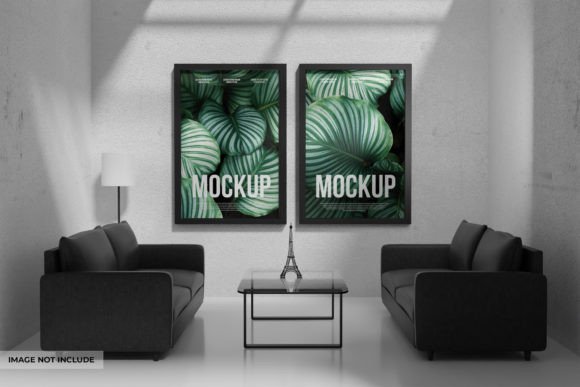
Photo-Poster Frame Mockup: A Visual Guide
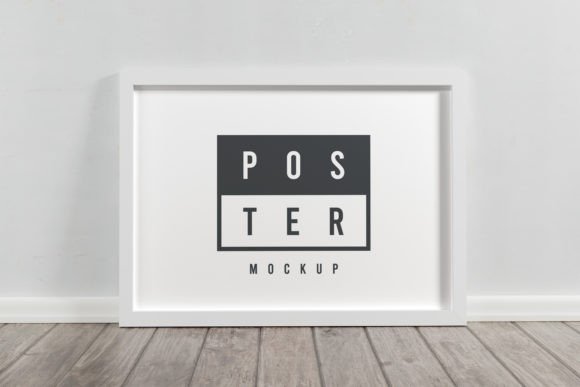
Presenting a design concept often feels like the hardest part of the creative process. You have spent hours refining typography, selecting the perfect color palette, and arranging elements to tell a story, yet showing that work as a flat digital file rarely captures its true potential. This is where a Photo-Poster Frame Mockup becomes an essential tool. It acts as a bridge between a raw digital asset and a tangible, real-world product, allowing viewers to visualize how a poster would actually look hanging in a home, displayed in an office, or featured in a marketing campaign.
At its core, this resource is a high-quality 3D rendered PSD file designed to streamline your workflow. It typically consists of a background layer that sets the scene and a specific Smart Object layer dedicated to your artwork. The magic lies in the editing process: you simply double-click the Smart Object, paste your design, save, and watch as the software automatically applies realistic lighting, shadows, and perspective distortions. For many, the ability to replace a label or poster design with a single click transforms a tedious formatting task into an instant presentation.
Why Different Creators Value Realism
The value of a mockup changes depending on who is holding the mouse. While the technical function remains the same—placing an image onto a frame—the priorities shift dramatically based on professional role and end goals.
For freelance graphic designers, speed and client communication are paramount. When pitching a branding package or a series of event posters, sending a flat JPEG can feel underwhelming. Using a Photo-Poster Frame Mockup allows them to contextualize their work immediately. A client might not understand why a specific font weight was chosen until they see it printed at scale on a wall. The mockup provides that context without the designer needing to physically print and photograph the item, saving both time and money while increasing the perceived value of the proposal.
Marketing managers and small business owners often face a different set of challenges. They need to produce high-volume content for social media, websites, and ad campaigns. Their priority is consistency and reliability. A fully layered PSD file offers the flexibility to swap out seasonal promotions or product announcements rapidly. Instead of organizing a photoshoot every time a new flyer is released, they can update the Smart Object and generate a professional-grade image in minutes. This efficiency ensures that their visual identity remains sharp across all channels, from Instagram stories to website banners.
Educational and Hobbyist Applications
The utility of these tools extends beyond commercial enterprise. Educators teaching digital arts or photography can use these files to demonstrate the importance of presentation. By showing students how lighting and environment affect the perception of a design, teachers can bridge the gap between theoretical design principles and practical application. It serves as a safe sandbox where learners can experiment with different compositions without the risk of wasting physical materials.
Similarly, hobbyists and photographers looking to sell prints online benefit immensely from realistic previews. A consumer browsing an Etsy shop or a personal portfolio is more likely to purchase a print if they can envision it in their own living space. A generic white background often fails to convey scale or texture. By utilizing a 3D rendered frame with realistic depth, creators can evoke an emotional response, helping the buyer imagine the art as part of their daily life. This psychological connection is often the deciding factor in a sale.
Evaluating Quality and Flexibility
Not all mockups are created equal, and understanding the technical specifications is crucial before integrating them into your workflow. When evaluating a Photo-Poster Frame Mockup, several key features determine its usefulness for your specific needs.
- Smart Object Integration: The most critical feature is the ease of editing. A well-constructed file allows you to replace the design using a single click. If the process requires complex masking or manual shadow adjustment, it defeats the purpose of using a template.
- Layer Organization: A fully layered file gives you control. You should be able to adjust the background brightness, modify the frame color, or tweak the intensity of the shadows to match your brand's aesthetic. Rigid files that lock these elements limit your creative freedom.
- Resolution and Rendering: High-quality 3D rendering ensures that textures look authentic. Pixelated edges or unnatural lighting can make even the best design look amateurish. Look for files that offer high resolution to ensure crisp details on both web and print mediums.
For beginners, the learning curve of Photoshop can be steep. However, Smart Objects simplify this significantly. They allow novice users to achieve professional results without needing advanced knowledge of blending modes or lighting techniques. This democratization of design tools means that a blogger or a startup founder can create marketing assets that rival those of large agencies.
Conversely, experienced professionals might look for deeper customization options. They may want to manipulate the environment to match a specific client's office decor or adjust the angle of the frame to fit a unique layout. For these users, the "fully layered" aspect is non-negotiable. They need the flexibility to deconstruct the scene and rebuild it to serve a highly specific narrative.
Making the Right Choice for Your Project
Deciding whether this type of mockup fits your current project comes down to identifying your primary goal. Are you trying to sell a physical product, pitch a service, or build a portfolio?
If your goal is commercial sales, realism is your biggest asset. Consumers need to trust the quality of what they are buying. A mockup that accurately simulates paper texture, glass reflection, and wall interaction builds that trust. In this scenario, investing time in finding a high-fidelity Photo-Poster Frame Mockup pays off in conversion rates.
If your focus is on rapid prototyping or internal reviews, speed takes precedence. You might prioritize a template that allows for batch processing or quick swaps, even if the environmental details are slightly less intricate. The ability to iterate quickly allows teams to test multiple design variations before settling on a final direction.
Ultimately, the versatility of these tools lies in their adaptability. Whether you are a publisher laying out a book cover, an entrepreneur launching a new cafe menu, or an artist showcasing a gallery collection, the right mockup elevates the work. It shifts the conversation from "what does this file look like?" to "how does this feel in the real world?" By leveraging the power of Smart Objects and high-quality 3D rendering, you can present your ideas with clarity and confidence, ensuring your audience sees your vision exactly as you intended.