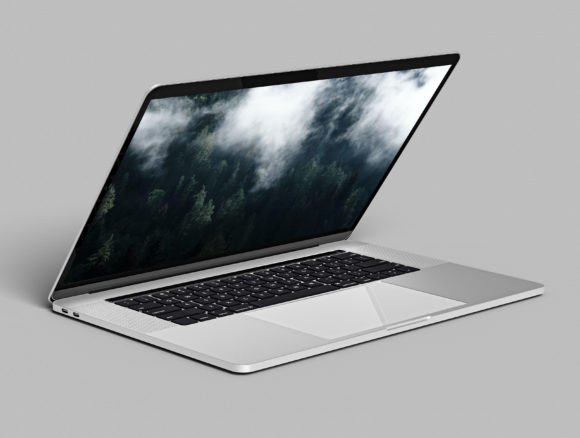
Professional Notebook Laptop Mockup for Designers
Presenting your digital work in a realistic setting is often the difference between a project that gets approved and one that gets overlooked. A Notebook Laptop Mockup serves as the bridge between a flat design file and a tangible product vision. Whether you are a freelancer showcasing a new website interface, a marketer creating social media assets, or a small business owner displaying your software, these tools allow you to visualize your ideas instantly. Instead of spending hours arranging lighting, finding a clean desk, and hiring a photographer, you can achieve professional results in minutes using high-quality digital templates.
The specific collection we are discussing today takes this convenience a step further. It includes 11 editable PSD files featuring 3D notebook and MacBook-style laptop designs. This variety ensures that no matter the angle or style you need, there is a file ready to accommodate your vision. The ability to switch between different modes and perspectives means you are not locked into a single look, giving you the creative freedom to match your brand's aesthetic perfectly.
Why Visual Realism Matters for Your Brand
In the digital age, first impressions are almost entirely visual. When a client or customer sees your design on a plain white background, they have to use their imagination to understand how it looks in the real world. A Notebook Laptop Mockup removes that cognitive load. By placing your screenshot or interface onto a realistic device, you provide immediate context. It helps stakeholders visualize the end product, making your proposal more compelling and easier to understand.
Consider the value of trust. High-quality visuals signal professionalism. If your portfolio or pitch deck features pixelated images or poorly lit photos of screens, it can inadvertently suggest a lack of attention to detail. Conversely, using a crisp, 4K image size mockup demonstrates that you care about presentation. This collection offers layered Photoshop files where every object is separated. This separation is crucial because it allows you to adjust shadows, reflections, and lighting to ensure your design blends seamlessly with the environment, rather than looking like a sticker pasted on top.
Key Features That Streamline Your Workflow
Efficiency is the primary reason designers and entrepreneurs turn to pre-made mockups. This particular set is designed for speed without sacrificing quality. Here is a breakdown of the features that make this tool indispensable:
- Versatile File Count: With 11 different PSD files included, you have a wide range of angles and compositions. You aren't limited to just one front-facing view; you can choose isometric views, side profiles, or open-lid perspectives to keep your content fresh.
- Customizable Modes: One of the standout capabilities is the option to change the laptop from "Normal mode" to "Clay mode." Normal mode provides a realistic metallic or plastic finish, while Clay mode offers a matte, monochromatic look that is trendy in modern minimalist design. This allows you to adapt the mockup to fit both corporate and creative branding styles.
- Full Background Control: The background color and images are fully editable. You can match the desk surface or wall behind the laptop to your company's brand colors, or insert a blurred office scene to add depth.
- High Resolution: Delivered in 4K, these files ensure that your final exports look sharp on retina displays, large monitors, and in print materials.
- Ease of Use: An instruction PDF is included inside the package. Even if you are a beginner with Photoshop, the smart object layers make the process intuitive. You simply double-click the layer, paste your design, save, and the mockup updates automatically.
Practical Applications Across Industries
The utility of a Notebook Laptop Mockup extends far beyond just graphic design portfolios. Its applications are diverse, serving various needs across personal, creative, and commercial sectors.
For web developers and UI/UX designers, these mockups are essential for case studies. When documenting a project on Behance or Dribbble, showing the interface on a sleek laptop frame adds a layer of polish that attracts potential employers. Similarly, software companies can use these templates for their landing pages. Instead of describing their dashboard, they can show it running on a realistic device, helping visitors immediately grasp the user experience.
Marketers and social media managers also benefit significantly. When announcing a new app feature or a blog post, a static screenshot can feel dry. Placing that screenshot within a 3D laptop scene creates an engaging visual stopper for Instagram or LinkedIn feeds. Furthermore, educators and course creators can use these images to create attractive thumbnails for video tutorials about coding or design, making their educational content look more premium.
Even freelancers who do not specialize in design can use this tool. If you are a copywriter pitching a website content strategy, including a mockup of what the text might look like on a screen can make your proposal stand out against competitors who only send text documents.
Getting Started: Tips for Best Results
While these tools are designed to be user-friendly, keeping a few best practices in mind will help you get the most out of your Notebook Laptop Mockup. First, always ensure your source image is high resolution. Since the mockup itself is 4K, inserting a low-resolution screenshot will result in a blurry final image that defeats the purpose of using a high-quality template.
Secondly, pay attention to the lighting in your design file. If your screenshot has a stark white background but the laptop screen in the mockup has a slight glare or ambient reflection, you may need to adjust the opacity or blending mode of your design layer slightly. The "Separated Object" feature mentioned in the file description is perfect for this; it allows you to tweak individual elements like the screen glow or the keyboard shadow to achieve a photorealistic blend.
Finally, don't be afraid to experiment with the Clay mode. While realistic modes are great for showing off specific hardware details, Clay mode is excellent for focusing purely on the content of the screen without distraction. It is particularly effective for minimalist brands or when you want the viewer's eye to go straight to the UI elements rather than the device itself.
Making the Right Choice for Your Projects
When selecting a mockup resource, consider the flexibility it offers. A single-angle file might work for one project, but having a pack of 11 different PSD files ensures longevity. You won't need to search for new resources every time you need a different perspective. The inclusion of an instruction PDF also highlights the creator's commitment to user experience, ensuring that even those new to Photoshop can navigate the layers confidently.
Ultimately, investing time in learning how to use these layered files pays off. It transforms a routine task into a creative opportunity. Whether you are building a portfolio, launching a product, or simply trying to make your weekly report look better, a reliable Notebook Laptop Mockup is a fundamental asset in your digital toolkit. By leveraging these 3D capabilities and editable features, you elevate the perceived value of your work, communicating quality and professionalism before a single word is read.